What is Elation Passport?
Elation Passport lets your provider send you secure messages, similar to email. You’ll receive an email or text notification when you have a new message and can log in to view it. In Passport, you can read and reply to messages, review attachments like lab results, and communicate directly with your Freedom Commons Wellness Center care team. You can also access your health information, including allergies, current medications, and visit notes all in one place.

Account Setup
To get started, contact your Freedom Commons Wellness Center care team to set up your account. They will send you an invitation to activate your Elation Passport.
You’ll need to provide:
- A valid email address where your invitation will be sent
- A mobile phone number where your activation code will be delivered
If you do not have access to an email address or a mobile phone, please speak with your care team about alternative options for setting up your Elation Passport account.

Activate Your Account
- You will receive an invitation email from "support@elationpassport.com" with the subject line [Provider's Name] has a secure message for you.
- Open the email and click the "Click here to Register for Passport" button.
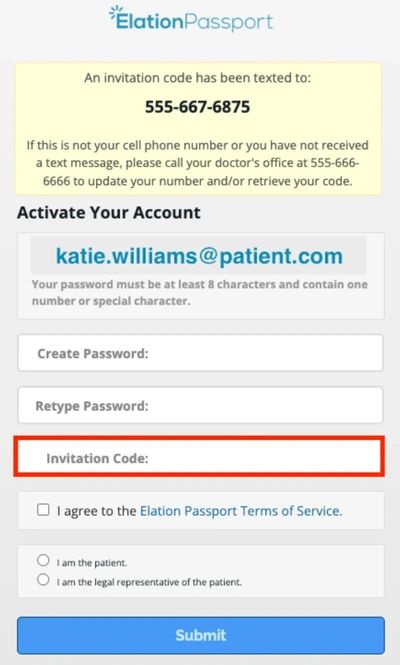
- A new page will open and prompt you to enter a 7-digit Passport Invitation Code and to create a password. The 7-digit Passport Invitation Code will be texted to the cell phone number stored in your chart.
- You must enter the 7-digit Passport Invitation Code, create a password, and enter it twice. Agree to Elation's Terms of Service and specify if you are a patient or a legal representative of the patient before you can complete registration.
- Once all fields are complete, click "Submit" to complete registration, and then you will be brought into your Passport account.